You Know What Needs Tracking. Setting It Up Shouldn't Be This Complicated.

Point, click, export to Google Tag Manager. No CSS guesswork, no dev tickets, no code on your site.

No more CSS selectors that break when the page changes

No more AJAX forms you can't track without a developer

No more skipping eCommerce tracking because it "requires code on your site"

7-day free trial available No Google API keys needed Cancel anytime

What beta testers are saying

"...I had 7 page elements that needed tracking before a Monday launch. Normally I'd be chasing our dev on the last week days. I did all by myself while enjoying my Monday morning coffee. Every event fired on the first test."

Sarah M.

Performance Marketing Manager

"...the AJAX form thing alone is worth it. I had a contact form that submitted without a page reload and I spent two days trying to track it. Tag Companion handled it with few clicks on my part."

Rajiv R.

Freelance Marketing Consultant

"...we used to bill clients 3-4 hours for GTM setup and half the time we would face issues with elements that can only be tracked by modifying the site code. The real issue is that we have no access to most of our clients sites. Now I don't mind about the site structure. It's done in less than 10 minutes and the margin on that service is insane."

Daniel K.

Agency Owner, 12 clients

How It Works

2-4 hours of back-and-forth becomes 15 minutes, one person, works first try.

1

Point & Click

Add a one-click helper (SDK) to Tag Manager (30 seconds). Click any element you want to track on your site. Get a selector that works.
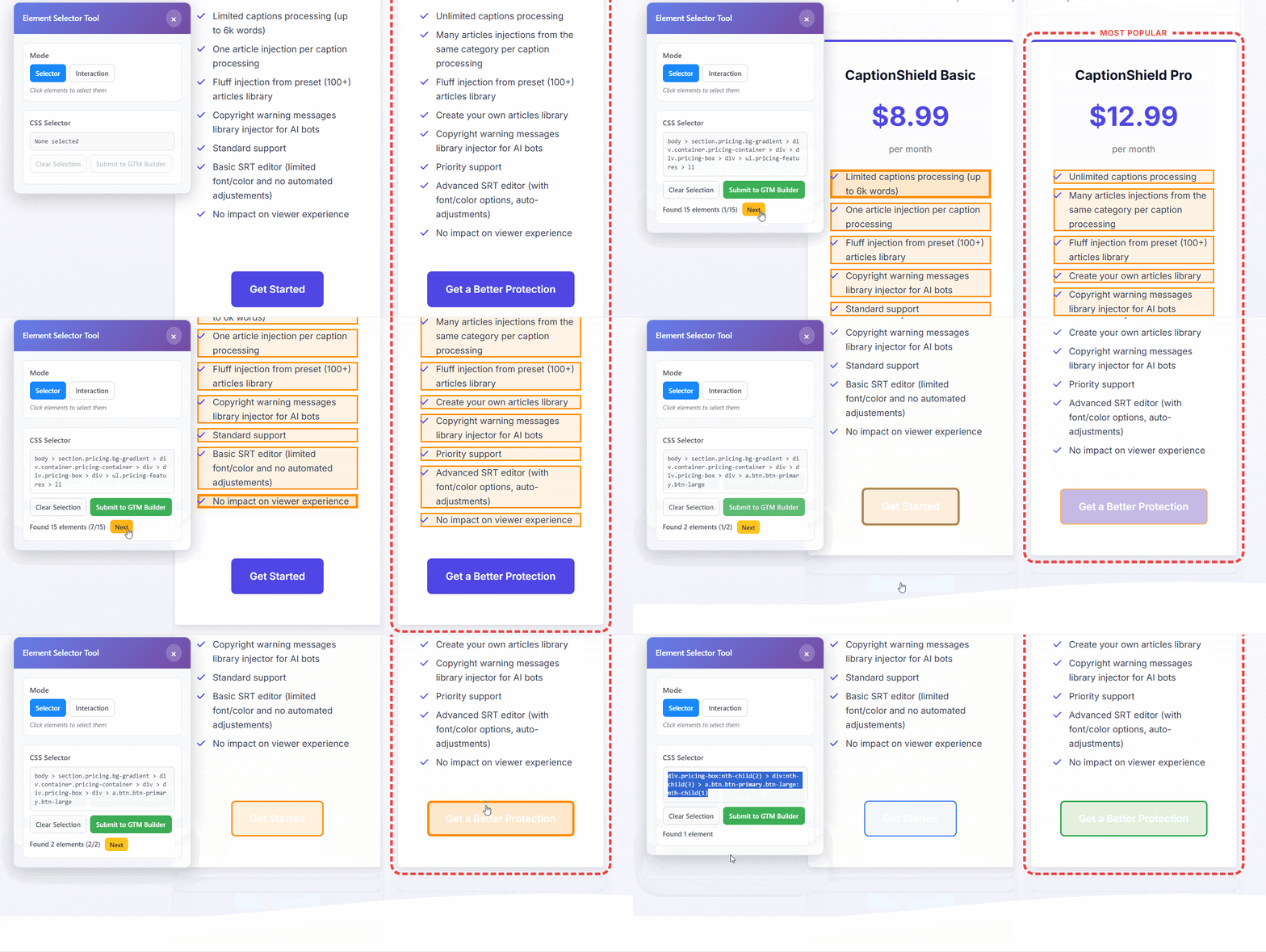
Point-and-click selector demo

Click to view full size

2

Configure

Set your GA4 event name and parameters. We build the complete GTM configuration.
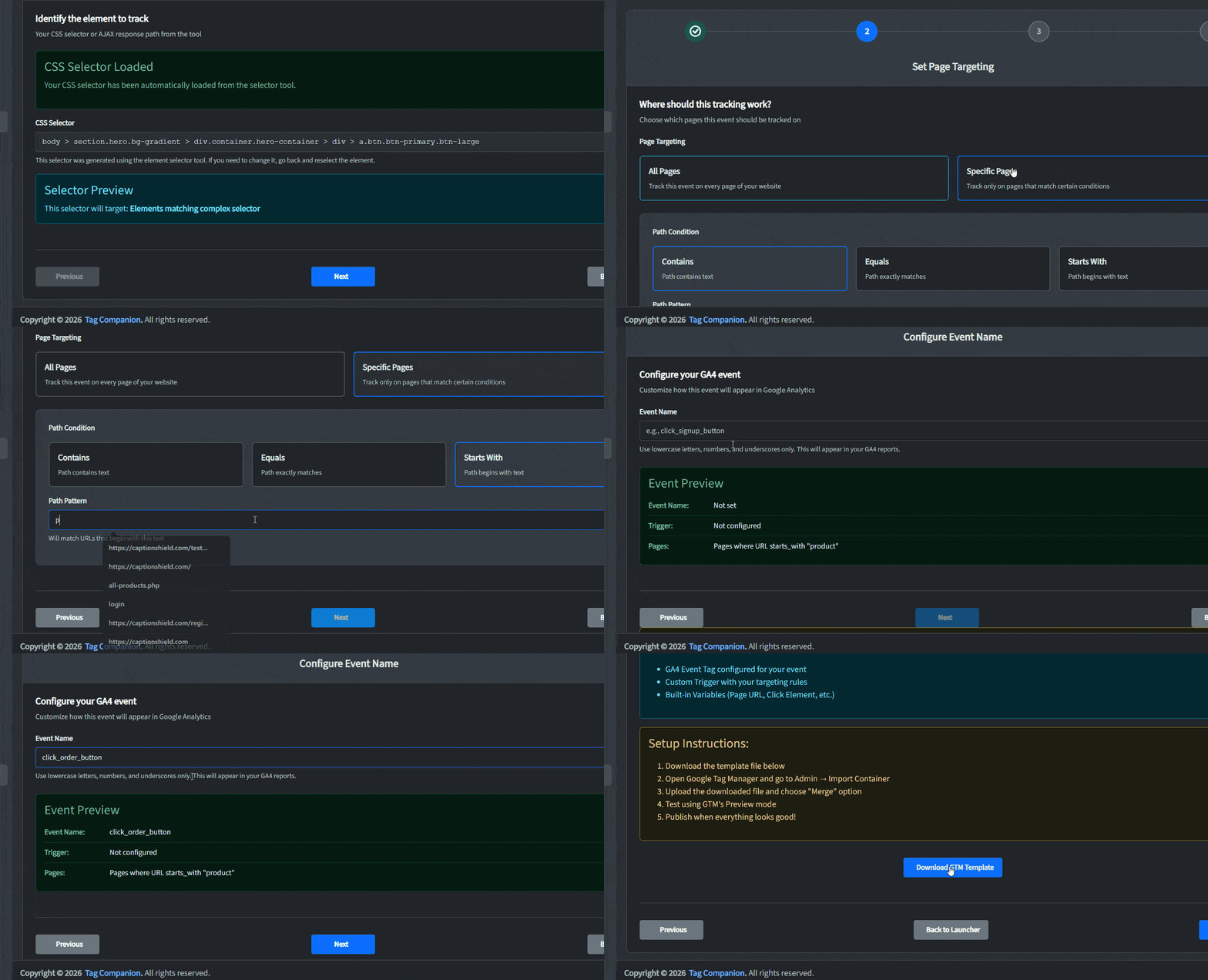
Configuration interface demo

Click to view full size

3

Import & Publish

Download your container file. Import to GTM. Publish. Your tracking runs through GTM - we just build the configuration.
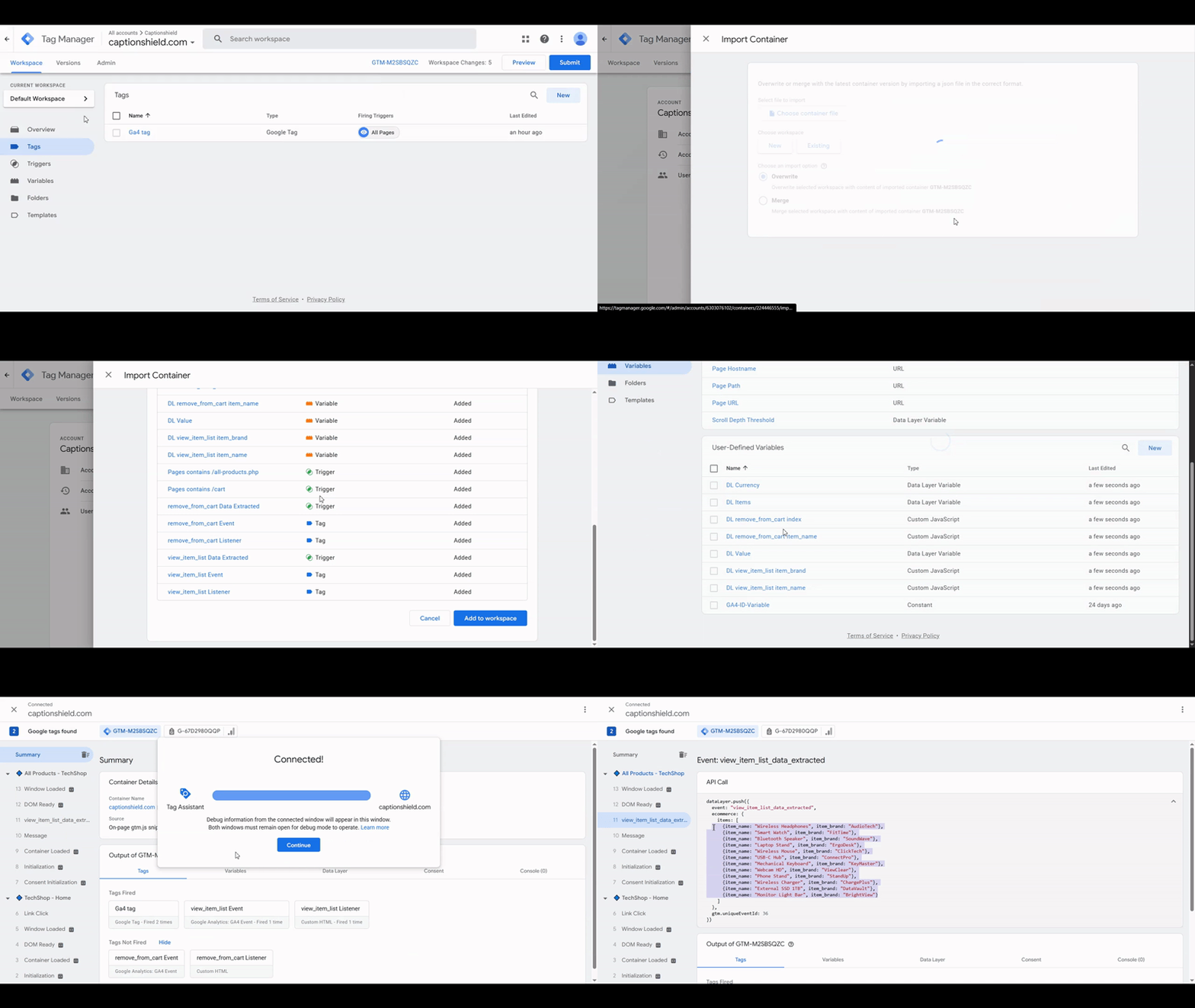
GTM import demo

Click to view full size

Watch: From Zero to a Working GA4 Event in Minutes

Full walkthrough — element selection, event configuration, and a live GTM Preview test.

The Cost Comparison

Break-even after tracking just 1 landing page

Traditional GTM Setup

Per landing page

  • Your time (2-4 hrs @ $50/hr): $100-200
  • Developer time (1-2 hrs @ $100/hr): $100-200
  • Debugging & revisions: $150+
  • Missed conversions from broken tracking: $300+

$650-850+

Hours of frustration. Might still break.

GTM Setup with Tag Companion

Per landing page

  • Tag Companion subscription: $19-39/month
  • Your time (15-20 minutes): $15-17
  • Developer time needed: $0
  • Debugging needed: $0 (works first try)

~$35-55

Your GTM setup works first try. Done in minutes.
For Agencies: 3-5x Your Margins

Client pays $750. Your cost drops from $400-600 to $50. New margin: 93%

Simple, Transparent Pricing

Founder's pricing for first 500 customers. Lock in these rates for life.

Free

$0 /month

Start tracking today

  • Set up GA4 in GTM without guessing
  • See exactly how far visitors scroll
  • Measure real engagement time
  • Email support
Start Free. No Card Needed
Most Popular

Basic

$19 /month

Track every conversion, no dev needed

  • Everything in Free, plus:
  • Point-and-click element selector
  • Track any button, link, or CTA click
  • Know when key elements appear on screen
  • Capture every form submission
  • Track forms that submit without reloading
  • Unlimited GTM template exports
  • Priority support
Start 7-Day Free Trial

Regular price: $47/month after launch

Pro

$39 /month

Full eCommerce tracking for stores & agencies

  • Everything in Basic, plus:
  • Full GA4 eCommerce tracking (13 events)
  • Guided setup for any skill level
  • Set up entire purchase funnel at once
  • Built-in error prevention
  • Premium support (24hr)
Start 7-Day Free Trial

Regular price: $97/month after launch

7-Day Pass

$24 /one-time

Everything unlocked for 7 days

  • Every feature, full access
  • Unlimited GTM template exports
  • Priority support
  • 7 days of complete access
  • Perfect for agencies
  • Bill directly to client
Get Full Access: $24 Only

30-day money-back guarantee Cancel anytime You own what you create

See full feature comparison

Frequently Asked Questions

Absolutely. Tag Companion generates GTM container files, not a replacement for GTM itself. We create the configuration (tags, triggers, variables) that you import into your existing GTM container. Think of us as a visual builder that outputs standard GTM JSON files. You maintain full control of your tracking setup.

Yes. If you can click a button, you can use Tag Companion. No coding knowledge required. Our point-and-click interface handles all the technical complexity for you.

Just re-select elements with the Website Helper and re-download the container file. Takes 5 minutes vs 2-4 hours of manual GTM reconfiguration and debugging.

Developers cost $100-200/hour and take 1-3 hours per page. Tag Companion costs $19-39/month for unlimited tracking setups. Break-even after 1-2 landing pages. Plus: no coordination overhead, no approval delays, ship today.

Tag Companion works great with standard marketing and eCommerce sites (WordPress, Shopify, WooCommerce, landing page builders). Not recommended for complex Single-Page Applications (React, Vue, Angular) with heavy client-side routing.

Yes. No contracts. No cancellation fees. Cancel from your dashboard anytime. You keep access until the end of your billing period, and you own all the container files you've created.

Nothing changes. The container files you export are standard GTM format — they work forever, with or without Tag Companion. Once imported to GTM, your tracking is 100% independent. No API calls back to us, no dependencies. You own what you create.

No. You only need access to Google Tag Manager. The Website Helper (SDK) installs directly into GTM in about 30 seconds: just import and publish. No code touches your website directly. The SDK loads through Tag Manager and only activates when you launch it from your dashboard. Your site's code never changes.

Stop Debugging. Start Tracking.

Set up your first event in 15 minutes. Free plan available, or try paid plans free for 7 days.

Founder's pricing for first 500 customers only. Lock in these rates for life.

Start Free Now
×