For marketers who run GTM, not build it

Track a new GA4 event without relearning Google Tag Manager every time.

Point at the button, form, or product action you want to track. Tag Companion builds the tags, triggers, variables, and any dataLayer or JavaScript it needs, then hands you a Google Tag Manager container to test and publish. No dev ticket, no waiting, no GTM refresher.

No Inspect Element. No selector guesswork. No writing dataLayer pushes or JavaScript listeners. No manually wiring Google Tag Manager components.

Select on your site Name the GA4 event Export to GTM Test and publish

No credit card required. Build your first click, scroll, or engagement event in a couple of minutes, no GTM refresher needed.
Watch Tag Companion in action
Watch ~1:30 overview
In-house marketers · Freelancers · Agencies · In-house marketers · Freelancers · Agencies · In-house marketers · Freelancers · Agencies · In-house marketers · Freelancers · Agencies · In-house marketers · Freelancers · Agencies · In-house marketers · Freelancers · Agencies ·

Where tracking time really goes

One tracking request forces a marketer to learn technical setup or wait for a developer.

The marketer knows what should count as a conversion. The work begins when that decision has to become selectors, triggers, tags, variables, code, and a working GA4 event.

For in house marketers

Google Tag Manager lands on your plate

You know what should be tracked, but someone still has to configure it. You can learn selectors, triggers, variables, and JavaScript yourself, or send the request to a developer and wait. Either way, campaign work loses time.

For agencies

One client event bounces between marketing and development

The marketer explains what should be measured. The developer builds it in Google Tag Manager. The marketer tests it. Questions and corrections move back and forth. One small tracking request consumes hours, slows delivery, and reduces the agency's margin.

Tag Companion gives the marketer a direct path to implementation.

The marketer selects the action on the website and names the event. Tag Companion builds the Google Tag Manager configuration. The marketer tests and publishes it. The developer stays focused on development.

In house marketers get back to campaigns. Agencies deliver tracking faster without pulling developers into every routine event.

How It Works

From page action to testable GTM event

Choose the action, define the event, then review the finished setup in your own GTM container.

1

Point to the action you want to measure

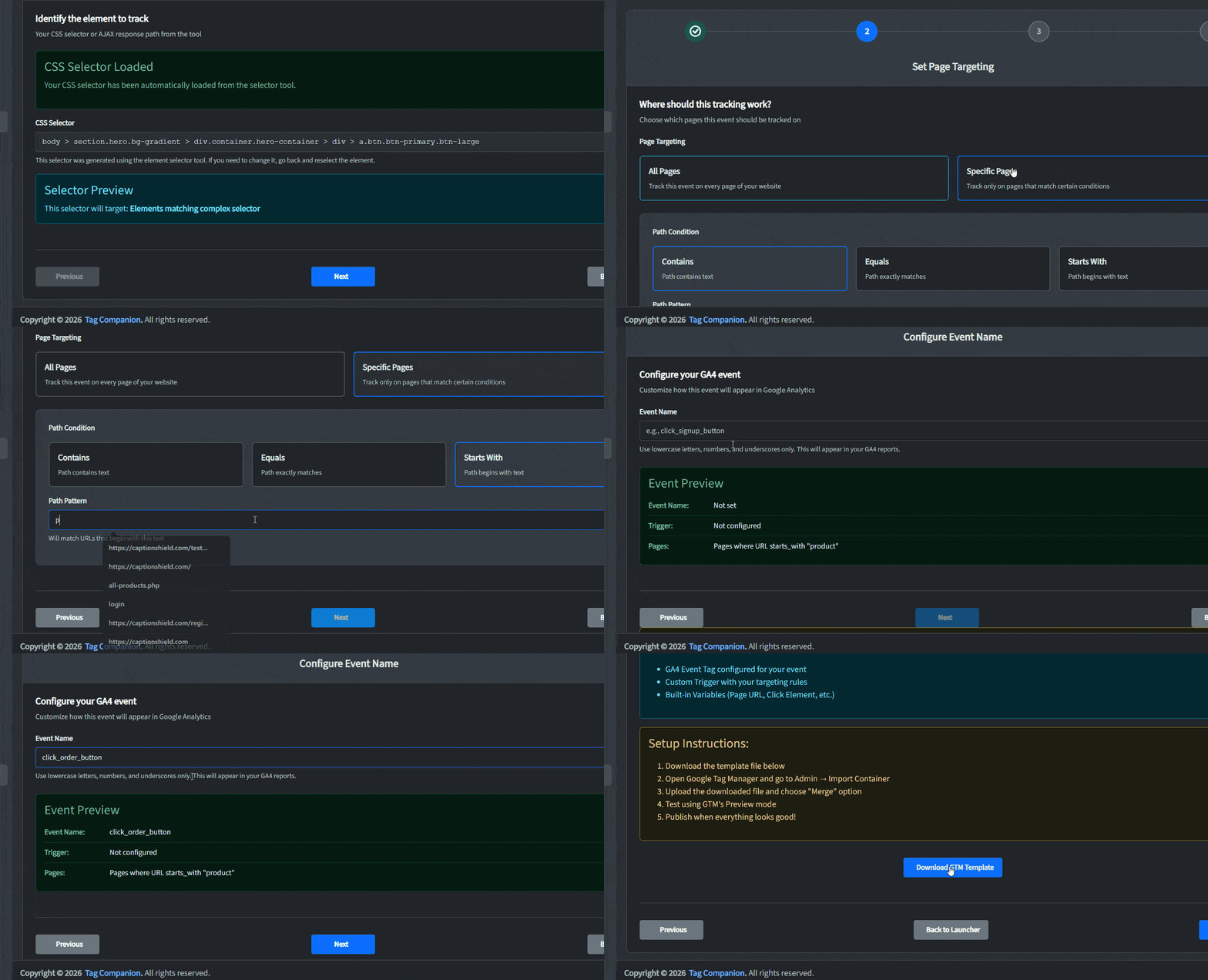
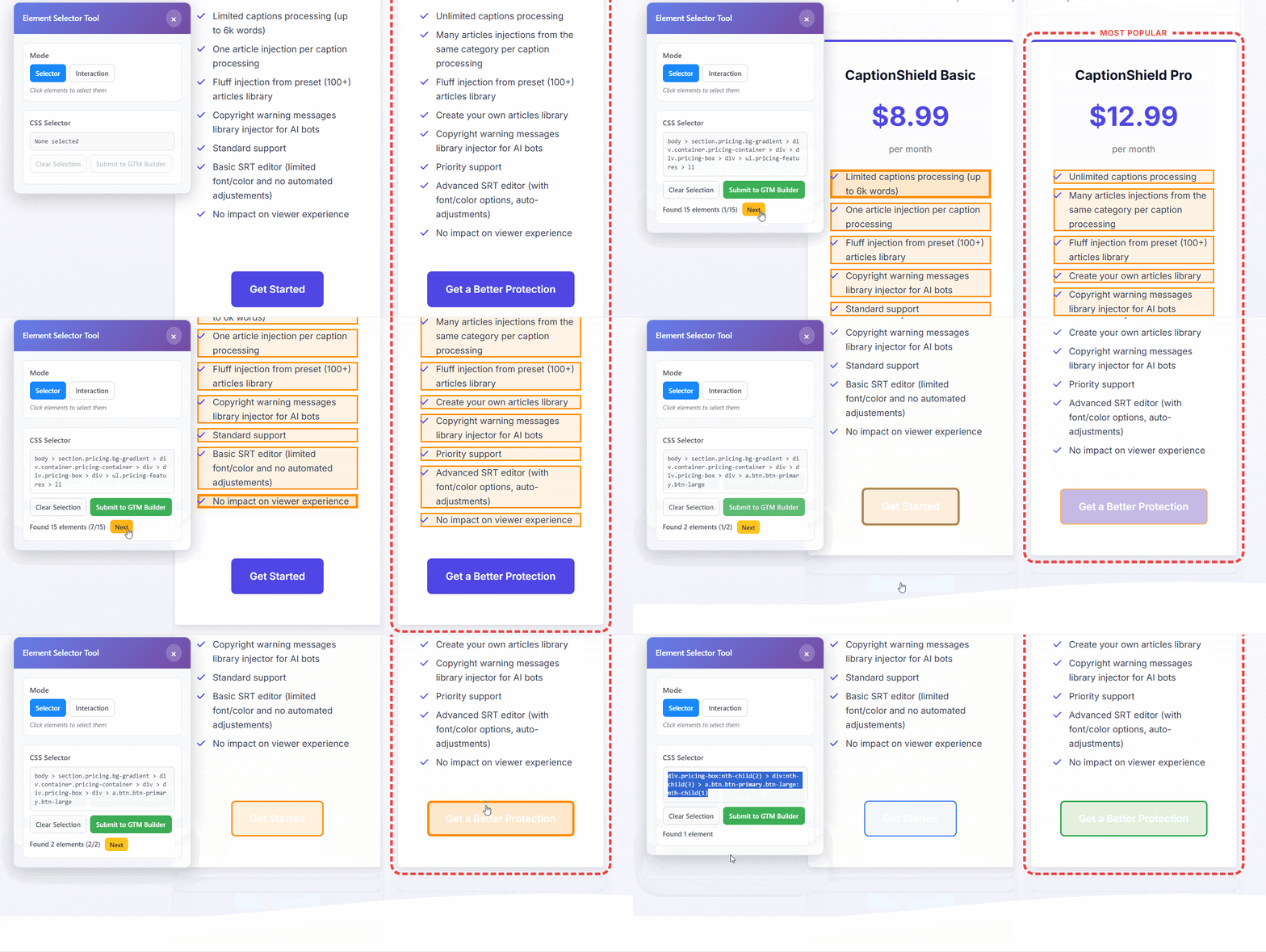
Open the Website Helper from your dashboard and click the exact button, link, form, or product detail you need. It captures the page element for your GTM trigger.

No site-code editing  ·  No visitor events sent to Tag Companion

Installing the Tag Companion SDK in GTM
View full size
2

Define the GA4 event

Give the event a useful name such as lead_form_submit, pricing_cta_click, or add_to_cart. Add the parameters you need for reporting.

Supports clicks, visibility, AJAX, and ecommerce  ·  Re-export saved projects when needed

Naming the GA4 event and configuring it in the Tag Companion dashboard
View full size
3

Import, test, and publish in GTM

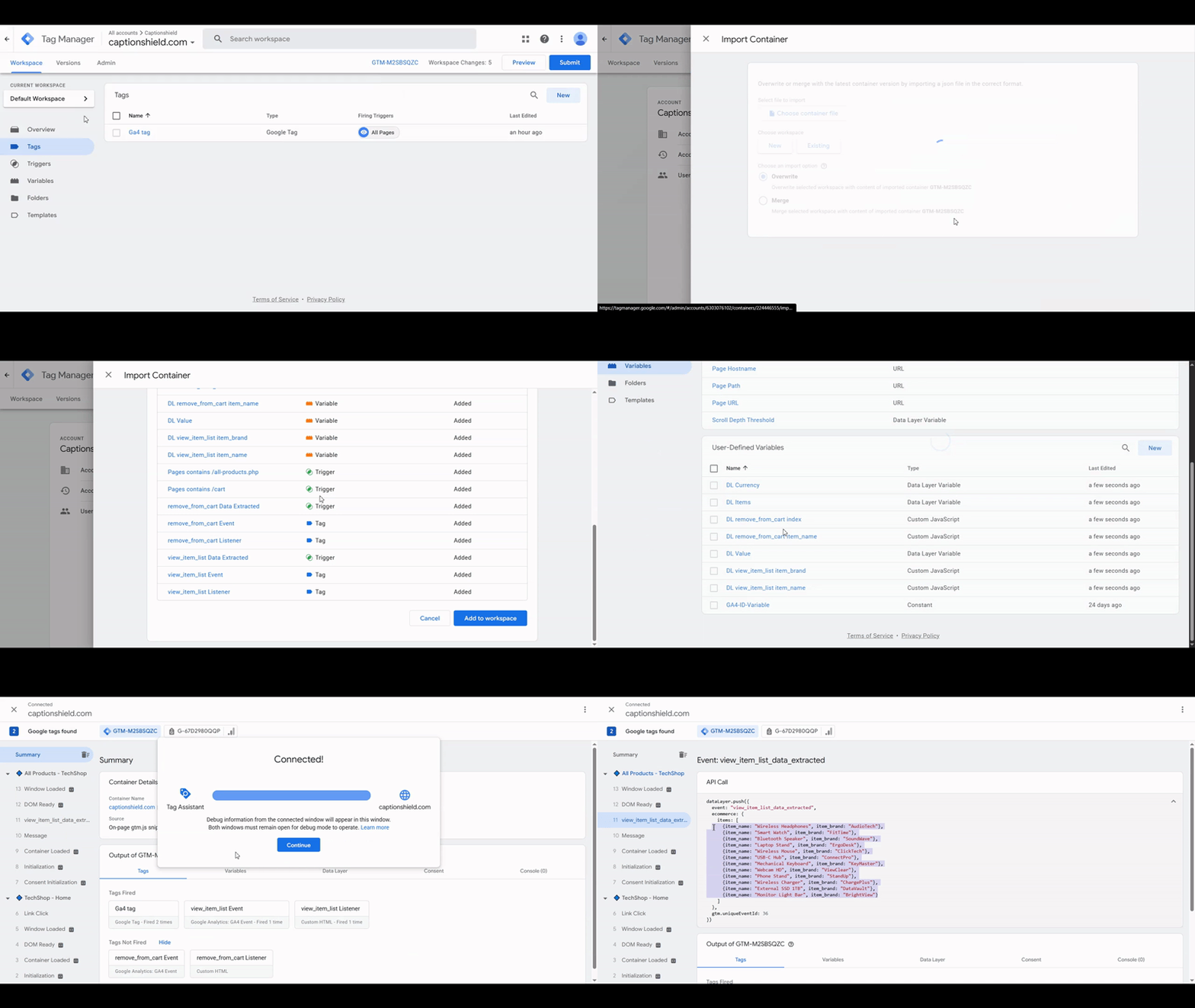
Download the container, import it using Merge, and verify the event in GTM Preview. Nothing goes live until you review and publish it.

Importing the generated container into Google Tag Manager
View full size

What you can measure

Track the actions that explain campaign performance

Start with everyday engagement events. Upgrade when forms and ecommerce require deeper GTM logic.

Free forever Create events for common page actions, no credit card needed.
Button and link clicks

Anywhere on the page

CTA and conversion clicks

Hero buttons, signup, checkout

Scroll depth

25, 50, 75, 100 percent

Time on page

Engagement thresholds

File downloads

PDFs, assets, anything linked

External link clicks

Outbound traffic

Modal and popup opens

Including delayed and exit-intent

Tab and accordion clicks

Engagement inside the page

Paid For forms and commerce events that need JavaScript, dataLayer logic, or additional GTM configuration.
AJAX form submissions
Basic

No page reload required

Element visibility
Basic

Fire when any element enters the viewport

GA4 ecommerce events
Pro

Build events from product data on the page

What People Say

People who needed control without another GTM rabbit hole

Not because learning GTM is wrong. Because campaign time is better spent on campaign decisions.

In-house marketer

"Had a launch coming up and about seven elements that needed tracking. Normally that's a ticket to our dev and a few days of waiting. I did it myself in one afternoon. Two of them I had to redo because I'd clicked the wrong element first time, but once they were right they fired in Preview."

Sarah M.

Performance Marketing Manager

Freelancer

"The AJAX form was the reason I tried it. A client's contact form submits without reloading and I'd burned the best part of a day on the trigger. Pointed at the form, named the event, imported it, and it worked. I couldn't tell you exactly what it generated, but the conversions are showing up."

Rajiv R.

Freelance Marketing Consultant

Agency owner

"We bill GTM setup by the hour and the painful part was always client sites where we have no code access. This stays inside GTM, so that stops being a blocker. It's not all point-and-click, the ecommerce setup took me a couple of goes to get the product fields right, but it's still faster than briefing a dev and waiting."

Daniel K.

Agency Owner, 12 clients

Your tracking stays in your GTM container

Tag Companion generates a standard GTM container file with the tags, triggers, variables, and custom JavaScript needed for the events you create. It does not host your tracking or sit between your website and GA4.

Import the file into your own account, inspect every component, and test it before publishing. If you cancel later, the tracking you already imported keeps running.

Standard GTM JSON format
Editable in GTM after import
No API calls back to Tag Companion
Merge import protects existing tags

Inspect the output

See what Tag Companion builds before it goes live

The visual workflow produces a standard GTM import file. It is not a hidden dependency or proprietary runtime.

Generated container file (standard GTM JSON)

{
  "exportFormatVersion": 2,
  "containerVersion": {
    "tag": [{
      "name": "cta_click Event",
      "type": "gaawe",
      "parameter": [
        { "type": "TEMPLATE", "key": "eventName", "value": "cta_click" },
        { "type": "TEMPLATE", "key": "measurementIdOverride", "value": "{{GA4 ID Variable}}" }
      ],
      "firingTriggerId": ["12"],
      "tagFiringOption": "ONCE_PER_EVENT"
    }],
    "trigger": [{
      "name": "Click - Hero CTA",
      "type": "CLICK",
      "filter": [{
        "type": "CSS_SELECTOR",
        "parameter": [
          { "type": "TEMPLATE", "key": "arg0", "value": "{{Click Element}}" },
          { "type": "TEMPLATE", "key": "arg1", "value": "a[data-cta='hero-start']" }
        ]
      }]
    }]
  }
}

The tag, trigger, selector, and GA4 event name are connected in the exported file.

And it imports straight into your GTM container

Importing the generated container into Google Tag Manager
View full size

Import using Merge, verify the event in Preview, then publish when you are satisfied.

The hidden cost

Every tracking request comes with a price and a wait

A freelancer needs a brief. An agency needs a ticket and delivery window. Tag Companion gives you a direct path from “we need this event” to a Google Tag Manager configuration ready for review.

When you need... Freelancer Agency Tag Companion

Clicks, scroll, and time on page

About 5 common events

Send a brief · 1-2 days

$15-40

Open a ticket · 3-5 days

$200-500

Build directly · ~2-5 min/event*

Free, forever

Forms and AJAX conversions

About 10 events with custom logic

Brief the response logic · 2-4 days

$50-120

Scope custom setup · 1-2 weeks

$400-900

Configure visually · ~2-5 min/event*

Basic, $12.97/month

Full GA4 ecommerce setup

Product and transaction events

Map product fields · 3-7 days

$150-350

Scope and map data · 2-4 weeks

$800-2,000

Map visually · minutes, not weeks*

Pro, $27.97/month

One-off client project

Complete setup, once

New brief and wait

$150-350 each time

New scope and queue

$800-2,000 each time

Every feature · full access for 7 days

$19.97 once

Swipe to see all columns

Selectors built to survive minor site changes, not break silently

Tag Companion prefers stable IDs and semantic attributes such as name, aria-label, and data-* over fragile position-based selectors. A new wrapper element or a reordered section is far less likely to quietly kill your tracking than a selector pinned to the exact DOM position, which is how tracking usually breaks after a redesign without anyone noticing.

And if a bigger change ever does need an update, you re-select the element, export, and re-test in GTM Preview yourself. No new implementation request.

Freelancer and agency figures are typical market ranges; actual quotes and turnaround vary.
*Tag Companion estimates begin after initial project setup and exclude testing. Ecommerce mapping can take longer. Always verify events in GTM Preview before publishing.

See the full walkthrough

From dashboard to a live event firing in GTM Preview, end to end.

Tag Companion full product walkthrough
Watch full demo

Pricing

Start free. Upgrade when the event gets more technical.

Use Free for common engagement events, Basic for forms and AJAX, or Pro for ecommerce.

Try Basic or Pro free for 7 days. Cancel before the trial ends and you will not be charged.

Free

$0 /month

Measure common page engagement, no credit card needed

  • See exactly how far visitors scroll
  • Measure real engagement time
  • Point-and-click element selector
  • Track any button, link, or CTA click
  • Email support
Create your first event free
Most Popular

Basic

$12.97 /month

Build form, AJAX, and conversion events without writing the GTM logic yourself

  • Everything in Free, plus:
  • Know when key elements appear on screen
  • Capture every form submission
  • Track forms that submit without reloading
  • Unlimited GTM template exports
  • Priority support
Try Basic free for 7 days

Pro

$27.97 /month

Create GA4 ecommerce events for stores and client projects

  • Everything in Basic, plus:
  • Full GA4 eCommerce tracking (13 events), no dataLayer setup required
  • Guided setup for any skill level
  • Set up entire purchase funnel at once
  • Built-in error prevention
  • Premium support (24hr)
Try Pro free for 7 days

Need Tag Companion for one project?

For one-off and client projects
Get every feature for 7 days

Build and export what you need with one payment and no subscription.

Use every feature. $19.97 once

30-day money-back guarantee Cancel from your dashboard, anytime You own what you create

See full feature comparison

The questions people actually ask

No, as long as you choose the merge option in GTM's import dialog. We strongly recommend merge for all Tag Companion imports. Choosing overwrite will replace your existing tags, triggers, and variables, including any that were not created with Tag Companion.

Yes. Tag Companion gives you a standard GTM container file. You can open the JSON, import it into Google Tag Manager, review every tag, trigger, and variable, test it in GTM Preview mode, and only publish when you are comfortable. Nothing goes live automatically.

No. Once imported, your tracking runs inside your own Google Tag Manager container. Tag Companion does not sit in the data path, does not receive your visitor events, and does not need an API call to keep your tracking working.

Works with WordPress, Shopify storefronts, WooCommerce, Webflow, Unbounce, Leadpages, and any site where clicking a link fully reloads the page.

Not sure? Click a menu link on your client's site. If the URL changes and the browser reloads the page, you're good.

Not compatible with: Single Page Applications (SPAs) or sites that use client-side routing (React, Vue, Angular apps where the page never reloads). Also not compatible with Shopify's checkout pages unless you're on Shopify Plus. Standard storefronts work fine, but the checkout flow uses Shopify's own pixel system, which requires a different setup.

It still uses a dataLayer push, but Tag Companion builds it for you. During setup, you point and click the product name, price, and ID directly on your page. Tag Companion generates a GTM tag that reads those elements and assembles the dataLayer push automatically, no developer or site code changes needed.

Nothing changes. The container files you export are standard GTM format and they work forever, with or without Tag Companion. Once imported to GTM, your tracking is 100% independent. No API calls back to us, no dependencies. You own what you create.

Re-select the changed element with the Website Helper, export an updated container, and test it again in GTM Preview. You can make the update without opening another implementation request.

You do not need direct access to edit the site's source code, but you do need permission to import and publish in Google Tag Manager. The Website Helper installs through GTM and activates only when you launch it from your dashboard.

Absolutely. Tag Companion generates GTM container files, not a replacement for GTM itself. We create the configuration (tags, triggers, variables) that you import into your existing GTM container. Think of us as a visual builder that outputs standard GTM JSON files. You maintain full control of your tracking setup.

You do not need to write JavaScript or build GTM tags, triggers, and variables by hand. You do need access to GTM and enough familiarity to import a container, use Preview mode, and publish after testing. Tag Companion handles the configuration work; you keep control of quality assurance.

A developer is still the right choice when tracking depends on application code, a custom backend, or an unsupported site architecture. Tag Companion is designed for supported websites where the main barrier is translating a visible page action into a working GTM configuration. It removes the handoff for those repeatable setup jobs.

Yes. No contracts. No cancellation fees. Cancel from your dashboard anytime. You keep access until the end of your billing period, and you own all the container files you've created.

Create the event. Keep control of the tracking.

Build your first click, link, scroll, or engagement event free. Export it to your GTM container, test it in Preview, and publish it when you are ready.

No credit card required. Upgrade when forms, AJAX, or ecommerce need deeper setup.

30-day money-back guarantee on paid plans. Cancel anytime.

Create your first event free
×