Last Tuesday, a developer pushed a CSS update.
A class name changed from btn-submit to btn-primary. A routine refactor. Took the developer eleven minutes.
By Thursday, a company had lost four days of conversion data. The Meta pixel was dark. The Google Ads tag was firing on page load instead of on submission. The ad platform was making bidding decisions based on nothing.
Nobody noticed until Friday, when the ROAS tanked. And even then, the first assumption was creative fatigue. Then seasonality. Then audience saturation. The GTM container was the last place anyone looked.
That is the real GTM problem. Not that it is hard to learn. Not that the interface is unintuitive. The problem is that it is structurally fragile, and the fragility is silent. No error. No alert. No warning in your GTM dashboard. The tracking simply stops, and your ad platform starts flying blind while you troubleshoot assumptions.
That fragility was never inevitable. It was a design consequence nobody planned for.
How We Got Here
Google Tag Manager launched in 2012. The premise was genuinely revolutionary: give marketers a way to deploy tracking code without waiting for developers. No more tickets. No more sprint cycles. No more begging engineering to add a pixel to the checkout confirmation page.
For about three years, it worked exactly as intended. You dropped a container snippet on the site, you configured your tags through a UI, and tracking was in your hands.
Then the use cases got complicated.
The eCommerce events got complicated. The DataLayer got complicated. Custom event tracking required understanding JavaScript. Ajax forms required intercepting network requests. Element visibility triggers required knowing enough about DOM structure to write a CSS selector that would survive the next frontend deploy.
Marketers needed to become semi-developers to use a tool that was supposed to free them from developers.
A consulting ecosystem formed around that gap. Agencies built GTM practices. Freelancers built entire careers on tag management. Certification programs emerged. The complexity that was supposed to disappear became, instead, a credential.
None of this was malicious. The complexity was real. The expertise was real. The consultants who built those careers understood something genuine: clean conversion data is the foundation that ad performance is built on, and getting that data right requires knowing what you are doing.
But somewhere along the way, the complexity became the point. Mastering GTM became the goal, rather than getting the data.
Those are not the same thing.
The Selector Problem Is Not a Bug
Back to that developer. Back to btn-submit becoming btn-primary.
When a GTM consultant sets up a click tracking trigger, they typically open Chrome DevTools, right-click the element, copy the selector, paste it into GTM. The selector DevTools gives you looks something like this:
body > main > section.hero > div.form-wrapper > button.btn-submit
That selector is a structural address. It says: go to the body, find the main element, find the first section with class hero, find the div with class form-wrapper, find the button with class btn-submit.
It works perfectly until something changes. Add a wrapper div. Run an A/B test that restructures the hero section. Let the CMS update a template. Push a CSS refactor that renames btn-submit to btn-primary.
Any of those changes breaks the selector. The trigger stops firing. No warning.
This is not a bug in GTM. GTM is doing exactly what you told it to do: look for an element at that structural address. When the address no longer exists, there is nothing to find.
The problem is that DevTools generates the weakest possible version of the selector by default. It copies the full structural path because that is what DevTools is designed to do. It does not ask whether a more stable anchor exists on that element. It copies the path it sees.
A selector built on a stable identifier survives this. An ID, a class name that is not tied to visual styling and unlikely to change, a data attribute like data-testid placed intentionally by a developer. Any of those outlasts a layout change. A positional path does not.
The issue is not that marketers choose fragile selectors. It is that the default tool, DevTools, does not distinguish between fragile and stable. It outputs what it sees. The fragility is built into the workflow.
This is the GTM problem in its most concrete form: the standard workflow for setting up tracking produces tracking that is designed to break.
The DataLayer Was Supposed to Fix This
The DataLayer is a JavaScript array, window.dataLayer, that sits on your site and acts as a communication channel between the website and GTM. When something happens on the site, a developer pushes an event to the DataLayer. GTM listens, catches the push, fires the relevant tags.
It decouples tracking logic from DOM structure entirely. No CSS selectors. No fragile paths. The event happens, the developer declares it, GTM captures it.
The DataLayer is the right idea. It is genuinely the cleanest way to track in GTM when it is implemented correctly.
The problem: it requires a developer. Every single time.
You want to track a new form submission? A developer needs to add a dataLayer.push() call to the form submission handler. You want to track a product page view? A developer needs to push the event with the right schema. You want to track an eCommerce event? A developer needs to implement the full GA4 eCommerce DataLayer schema correctly.
For every new thing a marketer wants to track, a developer must write code and deploy it. This creates a dependency that turns every tracking request into a development ticket. The marketing team waits. The campaign launches anyway. The data is missing for the first two weeks. The ad platform makes worse decisions.
The DataLayer was supposed to free marketers from the DOM. Instead, it created a new dependency: the developer queue.
The Hidden Cost Nobody Invoices For
Here is the part that GTM consultants know but rarely say out loud.
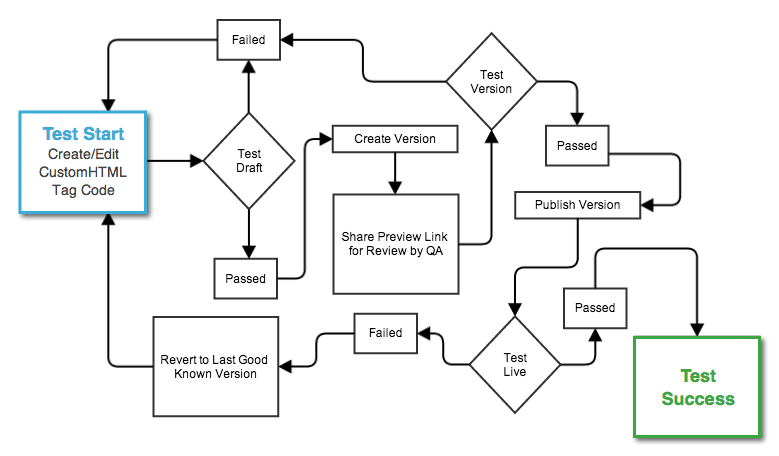
Every GTM implementation involves a loop. You make a change. You click Preview. You open Tag Assistant in a new tab. You trigger the event manually on the site. You go back to Tag Assistant and check whether the variables fired correctly. You realize the selector is wrong, or the trigger condition is off, or the variable is pulling the wrong value. You go back to GTM. You fix it. You click Preview again.
That loop runs six to ten times for a single tag. Sometimes more.
None of it is billable. No client will pay for 45 minutes of sandbox iteration on a form submission trigger. But those hours are real, and they compound across every engagement. A consultant doing five implementations a month is losing multiple billable hours to the Preview Mode loop every week, without even counting it as a cost.
And because it is untrackable and unquantifiable, it never gets surfaced as a problem. It gets absorbed into the mental overhead of doing GTM work. The consultant works around it. The client never sees it.
But the client pays for it anyway, in a different way: in rushed implementations, in reduced testing, in tags that go live before they are fully validated because the loop wore out the consultant's patience.
What This Actually Costs
All of this, the fragile selectors, the DataLayer dependency, the Preview Mode loop, converges on one outcome: degraded conversion signal.
Google Smart Bidding runs on conversion data. Meta Advantage+ runs on conversion data. When that data is incomplete, delayed, or intermittently broken, the algorithm makes worse decisions. Not catastrophically worse. Subtly worse. Worse in ways that look like market conditions, or creative fatigue, or audience saturation.
You cannot easily trace it back to the GTM container. You cannot see "these 340 conversions were not tracked because a CSS class was renamed on Tuesday." The signal is just thinner than it should be. The algorithm optimizes toward slightly wrong targets. The ROAS is lower than it would be with clean data.
This cost is invisible on your GTM invoice. It shows up in your ad performance, attributed to everything except its actual cause.
The Era This Is Describing Is Ending
The argument being made here is not that GTM expertise is worthless. It is the opposite: the expertise was always real, and it was always being wasted on the wrong problem.
The value a GTM consultant brings is not knowing how to navigate the GTM interface. It is not knowing how to write a CSS selector. It is not knowing how to build a DataLayer push. Those things are implementation details. They are the cost of doing the actual work, not the work itself.
The actual work is understanding what to measure, why it matters, how it connects to ad platform optimization, and how to build a tracking architecture that serves the business. That is strategy. That is genuinely hard to do well. That is where the expertise belongs.
What has been happening for the last decade is that consultants have been spending 60% of their time on the implementation details, because the implementation details were unavoidably complex. The complexity was not a feature. It was a tax.
When the tools improve enough to handle the implementation, the complexity does not disappear. It moves. It moves from the consultant's desk to the software. The consultant gets that 60% back, and the only question is what they do with it.
The Thesis, Stated Plainly
GTM was built for developers. It got adopted by marketers. The gap between who it was built for and who was actually using it created a decade of workarounds, consulting practices, certifications, and complexity culture built around a tool that was always just supposed to get the data.
The destination was always clean, resilient conversion signals. It was always accurate attribution. It was always an ad platform that had enough information to make good decisions.
The complexity that GTM veterans mastered was never the destination. It was the road. And the road was always supposed to improve.
Tag Companion exists because this argument is correct. It is a point-and-click GTM container generator: you select elements on your live site, configure what you want to track, and it produces a ready-to-import GTM container. The CSS selectors it generates prioritize IDs, class names, and data attributes over positional DOM paths.
The Ajax tracking it produces listens at the network layer, not the DOM layer. The eCommerce events it builds out do not require a DataLayer implementation.
It handles the 80% of standard tracking use cases that should never have required an expert.
The 20% of genuinely complex work, server-side architecture, consent mode v2, enterprise DataLayer schemas, legacy container audits, still requires human expertise. That work is not going anywhere.
But the conversation about where expertise is actually needed cannot happen until the tools stop making simple things artificially hard.
That conversation starts now.
Try Tag Companion free at tagcompanion.com. No credit card required.