Stop writing CSS selectors. Stop asking developers for help. Stop spending hours setting up basic click tracking.
Tag Companion's Website Helper lets you configure Google Tag Manager triggers by literally clicking the elements you want to track on your website.
How It Actually Works
Here's the complete workflow for tracking a button click:
- Click "Launch Website Helper" from the Tag Companion dashboard
- Your website opens with the Website Helper overlay active
- Click the button you want to track (add to cart, signup, download, whatever)
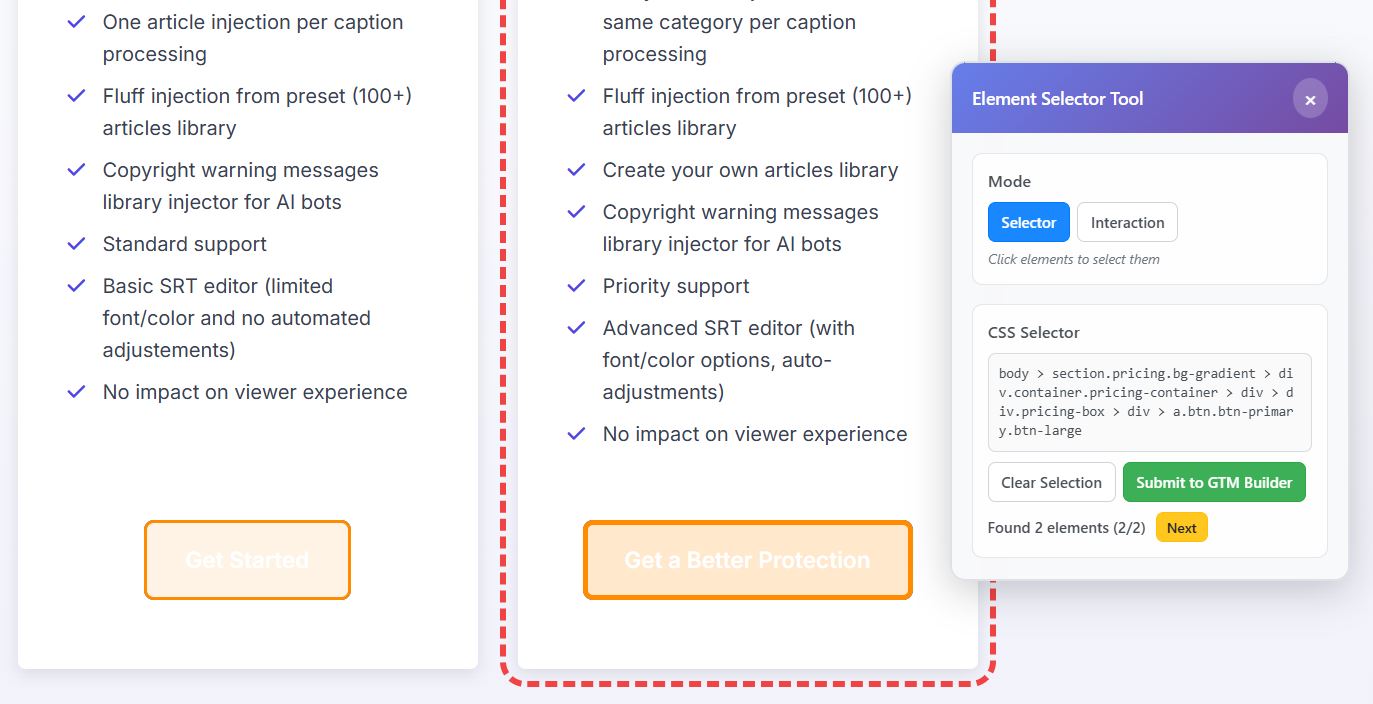
- The CSS selector auto-populates in the dashboard instantly, automatically
- Configure your event name and any additional parameters
- Download the GTM template and import it
Total time: 2 minutes. No CSS knowledge required. No developer needed.
The Smart Selector Algorithm
When you click an element, the Website Helper doesn't just grab a random CSS path. It intelligently generates the most specific, reliable selector possible:
- Prioritizes unique attributes like IDs and data attributes
- Auto-tests the selector to ensure it matches exactly one element
- Shows you visual feedback with color-coded highlights (green = perfect match, orange = needs refinement)
- Lets you refine multi-matches by clicking the specific element you want
- Automatically calculates nth-child positioning when needed
The result? A selector that actually works in production, not one that breaks when your site updates.
Beyond Simple Clicks
The point-and-click approach works for three tracking scenarios:
Click Tracking: Click any button, link, or element. The selector populates automatically. Configure and download.
Visibility Tracking: Click elements you want to track when they appear on screen (sections scrolling into view, modals opening, etc.). Same workflow.
eCommerce Tracking: Click product names, prices, IDs, quantities... the selector copies to your clipboard. Paste into the dashboard fields. Repeat for each product parameter. Build complete GA4 eCommerce tracking without touching code.
What You Get
Tag Companion generates complete GTM templates including:
- GA4 Event tags configured with your event names
- Click triggers with the exact CSS selectors you selected
- Data layer variables for dynamic values
- Custom HTML tags for AJAX tracking and data layer pushes
Import the template into GTM, publish, and your tracking works immediately. No custom JavaScript to write. No bugs to debug. No developer bottlenecks.
The Real Benefit
This isn't about saving 5 minutes. It's about making impossible tracking possible for non-technical marketers.
AJAX form submissions? Point and click. Dynamic product data? Point and click. Multi-step checkout tracking? Point and click.
Tasks that used to require a developer and 2-4 hours now take 15 minutes and zero coding knowledge.
That's the difference between actually tracking your conversions and putting it on the "someday" list forever.